How to Evaluate Document Management Software for a Tax Firm
Look beyond storage features to find DMS software that actually enforces compliance rules.

Document management software for a tax firm needs to do something generic cloud storage was never built to do: govern the lifecycle of a document, not just hold it. Dropbox and another cloud storage provider give a firm a place to put files. They don't log who touched a return, enforce how long a workpaper has to survive, or restrict a seasonal preparer from opening a client folder they were never assigned to. That gap is the entire subject of this piece.
Most firms don't discover the gap until an audit, a data breach, or an EFIN review forces the question. By then, the fix is expensive and the exposure is already on the record. A folder structure in a shared drive looks like organization, but it carries none of the structural requirements a tax practice is legally on the hook for: no version record showing which draft of a return was operative on a given date, no access log, no retention enforcement, no granular permission model, and none of the accounting-specific structures (PBC lists, workpaper binders, engagement letters, recurring compliance filings) that a firm actually works with day to day. Everything runs on staff memory and good intentions, which is a fragile system to build a licensed practice on.
The scale of the problem is visible in how practitioners describe their own days. Industry surveys have found that 79% of accountants say they spend too much time chasing information inside their own firm, and disorganized filing is the primary driver of that waste. Separately, the AICPA's Top Issues surveys have small tax firms naming tax law complexity and technology change management among their biggest operational headaches, three pressures that a badly chosen document system makes measurably worse, not better.
A document management system, done right, is not a nicer filing cabinet, and that distinction shapes the rest of this evaluation. It's a governed document lifecycle system, one that can prove who did what to a file, when, and under what authority. Everything below is a test for whether a given product actually clears that bar, or just looks like it does on a sales call.
The compliance obligations that shape every DMS requirement
Two frameworks generate nearly every requirement a tax firm should be checking for. IRS Publication 4557, Safeguarding Taxpayer Data, lays out the security measures the IRS expects preparers to have in place. The FTC Safeguards Rule, issued under the Gramm-Leach-Bliley Act and codified at 16 CFR Part 314, goes further: it requires a formal, written information security program covering risk assessment, access controls, encryption, and incident response.
Firm size is not a shield here. The Safeguards Rule applies with no revenue floor and no minimum return count, so a solo preparer carries the same obligation as a firm with a hundred staff. Tied to that is the Written Information Security Plan, or WISP, a document every tax professional is required to maintain regardless of firm structure. A document management system doesn't have to write the WISP for the firm, but it needs to support and evidence the controls the WISP claims are in place. If the plan says access is restricted by role and the software can't actually enforce that, the plan is fiction.
One control gets called out by name in both frameworks: multi-factor authentication. Under 16 CFR 314.4(c)(5), MFA is required for anyone accessing an information system, unless the firm's Qualified Individual has approved, in writing, an alternative control judged reasonably equivalent. That covers staff, seasonal preparers, bookkeepers, and contractors alike. IRS Publication 4557 names MFA as a required safeguard as well, so a vendor whose MFA is optional or easily skipped is failing a named federal requirement, not just falling short of best practice.
The stakes for getting this wrong are not abstract. The IRS can revoke a firm's EFIN, which ends e-filing capability in the middle of a season, a mechanism specific enough to shut down a practice's core function overnight. Violations can also trigger an FTC investigation, and under Revenue Procedure 2007-40, suspension of a firm's e-file provider status is on the table too.
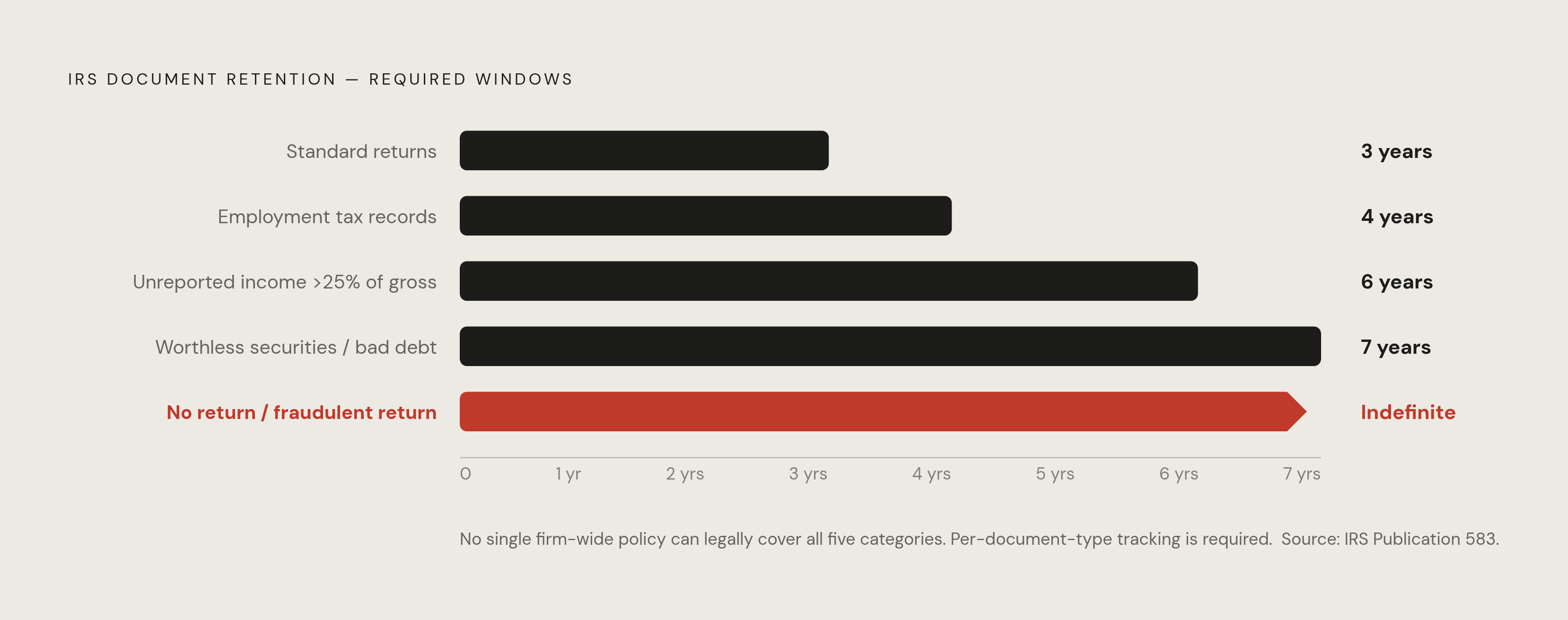
Retention adds a second layer of obligation, and it's more granular than most firms treat it. Per IRS guidance, the standard window is three years, extending to six years when unreported income exceeds 25% of the gross income shown on a return. Claims tied to worthless securities or bad debt deductions carry a seven-year window, a figure that applies specifically to those claim types under IRS guidance. Employment tax records need to survive four years past the date the tax becomes due or is paid. And when no return was filed, or a fraudulent one was, the retention period doesn't expire at all. State boards can extend any of these windows further, so firms have to check their own state's rules on top of the federal floor.
A DMS that can't automate these schedules, by document type, and produce a defensible log of what it destroyed and when, is asking staff to track seven overlapping timers by hand. That's not a retention policy. That's how firms end up either destroying something they were legally required to keep, or holding onto taxpayer data for a decade past its expiration for no reason other than nobody remembered to delete it.
Security architecture: the non-negotiable baseline before any other feature matters
Security isn't one line item on an evaluation spreadsheet sitting next to integrations and OCR accuracy. It's the filter that should eliminate vendors before the firm looks at anything else, because a system that fails here fails regardless of how good its other features are.
A handful of things need direct verification, not a vendor's word for it. MFA has to apply across every access point, including seasonal hires and outside contractors, and it needs to be confirmed as non-bypassable rather than a checkbox a busy staffer can skip during crunch weeks. Encryption at rest and in transit is required under the Safeguards Rule, so ask the vendor to name the actual standard they use rather than accepting "encrypted" as a full answer. Role-based access needs to be granular down to the client, folder, and document level, not just a blunt team-wide toggle. Firms already living inside Microsoft 365 or Google Workspace should check for SSO and SAML support, since that determines whether access management lives in one place or two. IP restrictions, approval workflows, ongoing vulnerability assessments, and secure disposal procedures for data past its retention date round out the list.
Multi-client practices carry an extra risk: when several clients' documents run through the same account, there has to be real logical separation between each client's data. A breach or a misconfigured permission that lets one client's folder bleed into another's is not a hypothetical, it's the exact failure mode role-based access controls exist to prevent.
SOC 2 certification is a meaningful signal worth verifying early in any vendor conversation, before pricing, before demos, before anything else. SOC 2 Type II is the floor, not the ceiling, and a vendor without either should face hard questions before the conversation goes any further. But the report's existence isn't the finish line. Ask what events the audit actually covers, and ask for a sample log. Vendors tend to use nearly identical language describing their security posture while logging very different things behind the scenes, and that gap only becomes visible when someone asks to see the actual output.
Audit trails and retention schedules: the two features generic storage cannot fake
Two things separate a real document management system from a well-organized folder: the audit trail and the retention engine. Neither can be faked or approximated by discipline and good habits, because both depend on the software recording things automatically that a human would eventually forget to log.
A compliant audit trail needs to capture document access (who opened a file and when), edits and version changes (what changed and who changed it), sharing and download events, and permission changes (who granted or revoked access to whom). Not every vendor logs all four categories, and that gap becomes visible only when someone goes looking for it during an actual dispute or audit.
Immutability is the requirement that gives the audit trail teeth. If a firm administrator, or worse, the vendor itself, can edit the log after the fact, it functions not as evidence but as a story someone told after the event. A tamper-evident log is the only version worth trusting.
The only reliable way to confirm any of this is a live demo, not a features page. Ask the vendor to pull up a sample audit log and walk through exactly which events show up in it. This is where products that read identically in marketing copy start to diverge, sometimes sharply.
Version control does similar work on a different axis. It needs to preserve which version of a return or engagement letter was the operative one at any given moment, which matters enormously if a filing is later questioned. Check-in and check-out controls stop two preparers from overwriting each other's work on the same file, a genuinely common failure mode in multi-preparer shops during peak season. And historical versions need to stay retrievable for as long as the applicable retention window requires, not just for a few months after the fact.
Retention automation has to be configurable by document type, because a single firm-wide policy is legally insufficient. A W-2 and a return connected to a fraud investigation do not carry the same retention floor, and a system that treats them the same is either over-retaining everything (a security liability and a storage cost) or under-retaining the documents that matter most. Defensible destruction closes the loop: the system needs to generate a record of exactly what was destroyed, when, and under which policy, because "secure disposal" in an audit context means proof, not a promise.
Firms running on generic cloud storage end up doing all of this manually, which is precisely how seven-year-old client files pile up indefinitely. That's not just clutter. It's a live data security liability sitting on the balance sheet as an unnecessary storage cost.
Tax-software integration: where workflow efficiency is won or lost
A document management system that doesn't talk to the firm's tax prep software creates a new manual step rather than eliminating an old one. Staff end up exporting from one system and uploading into another, which reintroduces exactly the delays and transcription errors the DMS was supposed to solve in the first place.
The right way to evaluate this starts before looking at any vendor at all: map the full current stack, including tax prep software, practice management tools, e-signature platforms, the accounting system, and email. Then check for native integrations specifically, not just the presence of an API. An API is not an integration. It's a possibility that requires developer time most small and mid-sized firms don't have sitting around.
Coverage varies meaningfully across the market. Some document management products connect natively with one or more major tax prep platforms such as Drake Tax, Lacerte, ProSeries, Intuit ProConnect, and UltraTax CS, with some platforms supporting direct filing into the correct client folder without leaving the tax software. Others are built as part of a broader suite from a single vendor, where document management functions as a core module rather than a bolt-on. The right fit depends entirely on what the firm is already running, and a firm should treat "integrates with everything" claims skeptically until the specific two or three connections that matter to its own stack are demonstrated.
Beyond the tax platform itself, check for sync with practice management systems, Microsoft 365 or SharePoint, Google Workspace, QuickBooks, Xero, and e-signature tools. Email capture and calendar sync speed up intake automation during the weeks when new client documents are arriving by the dozen.
One tight, bidirectional connection to the firm's primary tax platform is worth more than ten shallow ones scattered across the stack. Purpose-built tax document systems tend to carry these integrations as native functionality, while generic platforms typically treat them as third-party add-ons requiring separate setup and separate maintenance, which is its own ongoing cost even after the initial purchase decision is made.
OCR accuracy and AI-powered document processing: what actually predicts tax-season performance
Modern document management platforms do more than store files. The better ones auto-classify incoming documents by type (W-2, 1099, receipt) the moment they arrive, extract field-level data without a human retyping it, flag missing pages or numbers that don't reconcile, and route documents automatically based on what they are or where they stand in the workflow.
The single most predictive quality here is template-free extraction: the AI reads a field by what it means rather than by its position on a fixed layout. Firms receive documents from dozens or hundreds of clients, in every format imaginable, scanned and digital, clean and degraded. A tool that needs a pre-built template for every format will break the moment intake gets messy, which is every tax season by definition.
Vendor accuracy benchmarks deserve real skepticism. Most are measured against clean, standard-format documents, and that tells a firm almost nothing about how the tool performs against the actual mixed-format chaos of real client intake. The only honest test is running a firm's own varied documents, different issuers, some scanned, some digital, some genuinely poor quality, through the vendor's extraction live during a demo. That's where template dependency shows itself; a spec sheet will never reveal it.
Adoption of AI tools in accounting has moved fast. Per Wolters Kluwer's 2025 Future Ready Accountant report, AI use in the profession rose from 9% in 2024 to 41% in 2025, a jump substantial enough to reset what counts as the operational baseline among peer firms. Separately, firms adopting AI automation report meaningful reductions in time spent on routine document tasks, though that figure depends heavily on how well the specific tool handles a given firm's actual document mix rather than being a guaranteed outcome. The AICPA's PCPS CPA Firm Top Issues Survey backs this up from a different angle, finding that change management tied to technology and AI now ranks as a top long-term concern across firm sizes, with technology adoption sitting at the center of that concern rather than off in some future planning cycle.
Client portal quality and the adoption risk that derails otherwise solid implementations
The client portal is the highest-stakes variable in the entire implementation, because it's the intake point everything else depends on. If clients revert to emailing PDF attachments instead of using the portal, the automated workflow collapses at the very first step, and none of the auto-classification, routing, or audit trail functionality downstream ever gets a chance to run.
Portal friction needs to be tested from the client's seat, not the administrator's. How many clicks does it take a non-technical client to upload a single document? Mobile usability matters just as much, since clients increasingly photograph documents on their phones and expect to submit them the same way; a portal that performs badly on mobile will see low compliance no matter how well it works on desktop. Branding shapes outcomes: portals that look and feel like the firm's own interface build more trust and see higher use than ones that look obviously third-party or generic. Automated reminders, configurable in both timing and message, keep clients from stalling out mid-request. And confirmation on upload closes the loop: without a clear signal that a document arrived, clients email to double-check, which defeats the entire point of having a portal.
As with audit trails, OCR claims and logged events need to be confirmed live, in a demo, because vendors describing portal capability tend to use very similar language while delivering different actual client-facing experiences.
The strongest portals tie directly into request lists, so a client sees exactly what's still needed, uploads against that specific request, and the document lands automatically in the correct folder. That's a meaningfully different experience from a generic "upload here" box with no context, and it's usually the difference between a portal clients actually use and one they tolerate.
Running a pilot with a small group of real clients before a full rollout is worth the extra two weeks it costs. Adoption problems appear fast, almost always in the first two weeks, and they're far cheaper to fix before the entire practice has migrated onto the new system than after.
Role-based permissions and multi-user access controls in a tax firm context
Generic permission models, built for general business use, don't map onto how a tax firm is actually staffed. A seasonal preparer shouldn't carry the same access as a partner. A bookkeeper assigned to one client shouldn't be able to open another client's folder just because they're logged into the same account. An admin handling billing shouldn't be able to download completed tax returns. And outside contractors, IT support, HR, need system access without ever touching a client document.
Verifying the permissions model means checking a few specific mechanics directly. Can access be set independently at the client level, the folder level, and the document level, or does everything collapse into one broad tier? Does a role set at the client level correctly inherit down through subfolders, or does someone have to go configure each layer by hand, which is exactly the kind of manual step that gets skipped under deadline pressure? And can access be granted for a defined, temporary window, tied to something like a seasonal preparer's actual engagement dates, so that access expires on its own rather than depending on someone remembering to revoke it months later.
That last point sets up the specific risk described next: a seasonal hire from two years ago who still technically has credentials because nobody circled back to close them out. A firm's biggest access risk usually isn't a malicious outsider. It's a seasonal hire from two years ago who still technically has credentials because nobody circled back to close them out, which is the kind of operational exposure that tools built specifically for tax practitioners, like Marble, an AI research and drafting assistant that helps tax professionals answer federal and state questions with citations and prepare client-facing documents, are designed to work alongside rather than patch over.