Automating Recurring Tax Engagement Tasks
Firms automate the repeatable tax season cycle to handle rising volume and staff shortages.

The tax engagement lifecycle runs on a fixed sequence that repeats every season: intake, organizer delivery, document chasing, data extraction, review routing, and filing delivery. That sequence is where automation belongs first, because it is the part of the practice that already behaves like a script. The same trigger produces the same action and the same outcome every cycle, and that is the one condition software needs if it's going to take over a task reliably. But that condition doesn't hold for judgment-heavy advisory work, so you can't automate it the same way. Two forces are making the old way of running that script unworkable: a shortage of qualified staff that hiring alone can't fix, and a steady rise in return volume. Thomson Reuters' 2026 AI Report found that only a small minority of firms still report using no automation at all, and that share fell sharply from the year before, a sign the profession is moving fast. The underlying math is simple. Firms cannot add clients at the pace they're adding them and staff at the same rate, so the only path to more throughput is removing manual steps from the repeatable spine of the work rather than hoping to hire past the gap.
Where the manual work concentrates
Manual tax-season workflows break down in the same few places at nearly every firm, and each break feeds the next one. IRIS Global's Tax Season Workflow Automation Guide for CPA Firms points to three structural causes: staff spend their time chasing documents instead of tracking them, nobody has a shared view of where a job actually stands, and tax records end up scattered across email threads and shared drives. None of those three problems stays contained. If a firm can't track documents, it can't give a reviewer an accurate status, and if its records sit scattered across five inboxes, it can't reconstruct a job fast when a client calls to ask where things stand.
Document collection is where the breakdown first becomes visible. Most CPA firms see only a 40 to 60 percent return rate on manual organizer delivery, so a third or more of organizers are still incomplete heading into filing season. The mechanism behind that number is behavioral: a generic reminder with no reference to the client's specific situation and no firm deadline reads as low-priority, and a non-urgent task gets pushed to tomorrow indefinitely. Once that organizer is late, everything downstream is late too.
No other recurring task in the cycle absorbs as much raw labor as data extraction. Scraping values off W-2s, 1099-NECs, and K-1s into preparation software is the highest-volume bottleneck by hours consumed, and Dext estimates it takes three to four minutes per document if you do it by hand. Multiplied across a firm with hundreds of clients and multiple documents per client, that per-document time becomes weeks of staff time spent on work that carries no judgment.
Review routing adds a smaller delay per return, but it adds up across a season. When a preparer finishes a return and marks it ready, someone still has to notify the reviewer by hand before anything else can happen. US Tech Automations' CPA Automation Playbook states that this lag is minor on any single return, but it compounds into a significant queue backlog by the time the season peaks.
None of these bottlenecks operates in isolation. A missed organizer delays extraction. Delayed extraction delays review routing. Delayed review routing delays filing, and a delayed filing delays invoicing. The sequence runs in one direction, so if a firm fixes extraction but leaves organizer collection untouched, it has only moved the backlog downstream, not removed it. Financial Cents' 2025 Workflow and Automation Report found that a majority of firm owners still experience exactly this pattern: missed deadlines, lost tasks, and no real-time visibility into where work actually stands. That finding confirms the compounding problem is standard practice across the profession, not an outlier at a handful of disorganized shops.
How automation changes each stage of the engagement lifecycle
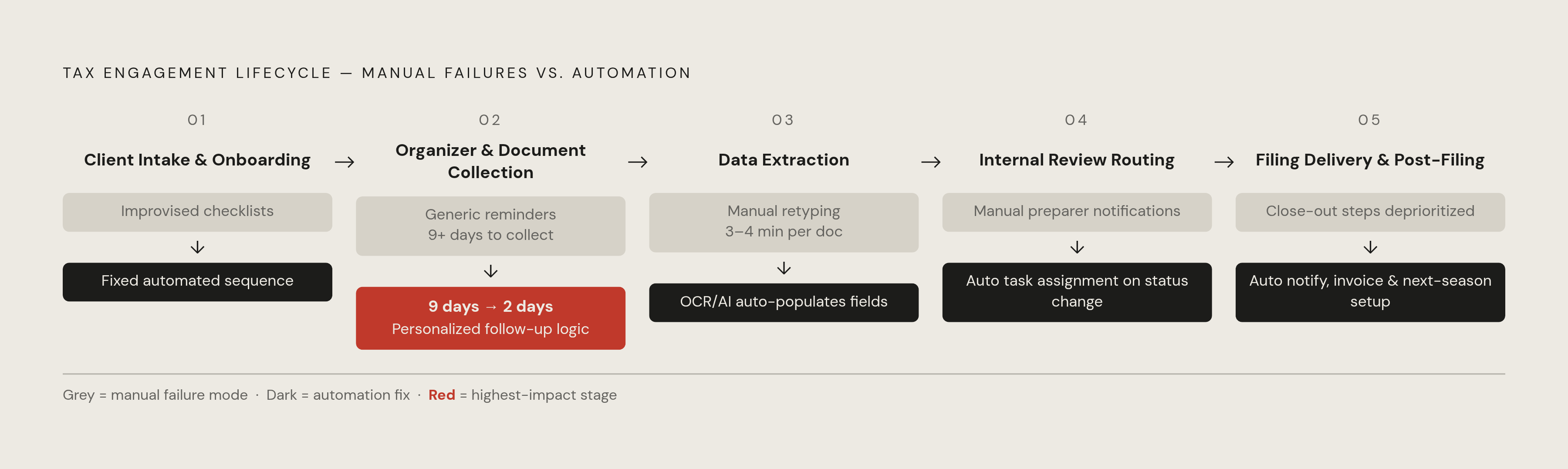
So you have to treat the engagement lifecycle as a chain of discrete stages, each with its own failure mode and its own automation fix. The pattern at each stage is the same: replace a manual trigger, usually a person remembering to notify another person, with an event that fires on its own.
Stage 1: Client intake and onboarding
Manual onboarding tends to run on improvised checklists and one-off emails with no standard order of operations, and the damage is worst when a new client signs on just before filing season starts, when staff have the least spare time to improvise a process from scratch. Automated onboarding replaces that improvisation with a fixed sequence that runs the same way every time. So the firm's onboarding sequence runs the same way whether one new client arrives or twenty arrive in the same week, and no staff member needs to remember to start it.
Stage 2: Organizer delivery and document collection
This is where the 40 to 60 percent return-rate problem lives, and its cause is a reminder system with no personalization, no specific deadline, and no follow-up logic built in. The fix replaces generic reminders with messages that name the client, their prior-year filing status, and a specific completion date, and it pairs them with follow-up sequences that escalate on their own when a client takes no action. A secure client portal replaces email attachments with a submission channel that tracks what has arrived and what hasn't, so staff get the shared status view manual tracking never gave them. The effect is measurable: US Tech Automations' CPA Automation Playbook reports that firms running automated document collection cut average document-chase time from more than nine days per client down to just over two days. A concrete version of this fix already exists in the market. As of November 2025, Liscio and GruntWorx connected their systems so that documents a client uploads in Liscio flow directly into GruntWorx's automation suite, where they get sorted, verified, and prepared for tax processing without a staff member moving them by hand. That integration closes the exact gap the manual process leaves open, the one between client-facing collection and back-end extraction.
Stage 3: Data extraction from source documents
Manual extraction means staff physically reading W-2s, 1099s, and K-1s and typing the values into preparation software by hand, the highest-volume and lowest-judgment task in the entire cycle. OCR and AI extraction tools fix this by recognizing document types automatically, pulling the relevant values, and populating the right fields without anyone retyping a number. TaxGPT's Tax Prep Agent, released March 24, 2026, illustrates what this pattern looks like in a working product: it pulls workpapers, W-2s, 1099s, K-1s, and Excel trial balances, from local folders or intake software, opens the tax platform through browser automation, enters the return data, runs diagnostics, and flags anything that needs a human to look at it. For a firm processing a large volume of returns, TaxGPT projects meaningful time saved on each 1040 and a real increase in how many returns staff can review in a season. The value here isn't only speed. Thomson Reuters notes that every manual keystroke in the extraction process is a point where a transposed digit or a missed field can enter the return, and removing the keystroke removes the risk with it.
Stage 4: Internal review routing
The failure here is that a preparer finishing a return still has to manually tell a reviewer the work is ready, and that single notification step is what creates the queue delays described earlier. US Tech Automations describes an automation pattern that removes the human messenger entirely: once a preparer marks a return "ready for review," the system creates a task assignment for the reviewer automatically, attached to the return's details and its deadline. Engagement letter e-signature belongs in this same stage of the fix. Automating the e-sign trigger at the start of an engagement removes a delay that otherwise sits in front of all preparation work, before a preparer can even begin. Implementation for review-routing automation takes three to six weeks, a medium level of effort that returns meaningful annual time savings, which makes it one of the higher-value investments in the stack.
Stage 5: Filing delivery and post-filing follow-up
The last stage fails for a human reason more than a technical one: confirming a filing, sending the client their copy, and setting up next season's tasks are all steps that get deprioritized once the season is winding down and staff attention has already moved elsewhere. Automation fixes this by making filing confirmation trigger an automatic client notification with a copy of the filed return attached, and by making the post-filing workflow trigger invoice generation and next-season task setup on its own. CPA Site Solutions' workflow guide notes that this same automation can set up next year's tax workflow tasks as part of the post-filing close-out sequence, so the end of one season becomes the structured start of the next rather than a gap that has to be rebuilt from memory. Invoice follow-up automation fits into this same close-out step: it takes one to two weeks to implement, delivers annual time savings, and ranks among the highest-return automations in the stack.
What the firms that have done this gained
The firms that have automated this spine report throughput gains, not just time saved on individual tasks: higher throughput lets a firm take on more clients without adding headcount. TaxGPT's Tax Prep Agent reports a sharp reduction in first-pass prep time across its platform, and for a firm processing thousands of returns in a season, that kind of reduction changes how much capacity the firm actually has to work with, not just how fast any single return moves.
A domain-specific version of the same pattern appears in R&D tax credit work. Neo.Tax connects directly to the engineering and project management tools where qualifying work is already recorded, clusters that data into IRS-qualifying business components, applies the four-part test automatically, and reconciles payroll and general ledger data, so there's no retrospective survey or manual extraction step. The same principle that governs client data collection and document extraction elsewhere in the firm applies here too: connect to where the data already lives instead of asking a person to move it by hand.
Firms that automate a meaningful share of recurring tasks, including document collection, bank reconciliation, invoice matching, and close-cycle steps, can typically handle twice the client volume without growing staff in proportion. That is the capacity arithmetic from the opening argument, measured here as an outcome rather than a projection.
The gain for staff is concrete rather than abstract. Thomson Reuters reports that automating repetitive data entry, document organization, and client follow-up work recovers hundreds of hours per year for firm staff, which cuts into the overtime and burnout that define peak season at most practices. Those recovered hours let a firm shift staff attention toward the advisory conversations that require a practitioner's judgment, the work the recurring spine was never suited to handle.