Tax Workflow Automation for Small Firms
CPAs can reclaim half a million dollars annually by automating the client intake bottleneck first.
The AICPA's 2025 Technology Survey found that the average CPA firm spends between 23% and 31% of billable staff time on administrative tasks that automation can eliminate or substantially reduce. For a ten-person firm billing at $120 per hour, that translates to somewhere between $552,000 and $744,000 in annual opportunity cost — squandered capacity, time the firm already paid for that produced nothing billable in return.
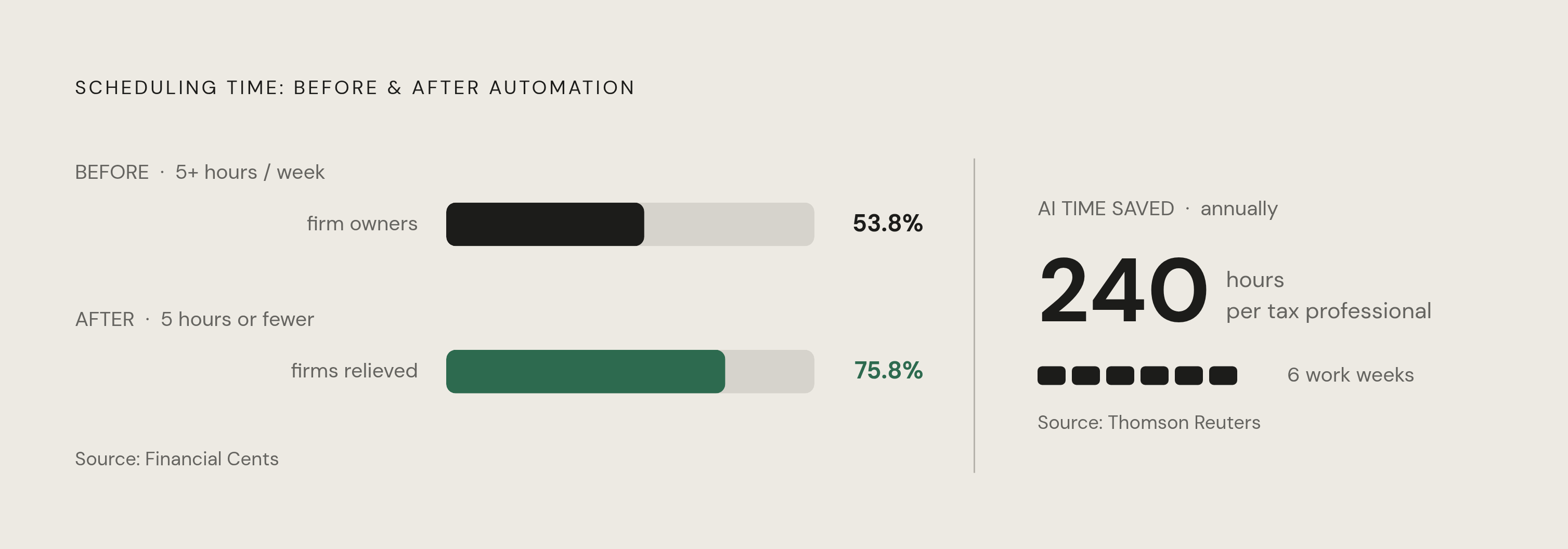
The single biggest workflow complaint firm owners raise is not software complexity, not regulatory burden, not staffing shortages in isolation. It's getting documents from clients. That bottleneck sits at the front of every engagement, so it delays everything downstream. Per the 2025 Financial Cents State of Accounting Workflow Automation Report, 53.8% of firm owners spent more than five hours per week on scheduling and assigning work alone, before any actual tax preparation had begun.
Incomplete or disorganized client documentation compounds the damage from there. Preparers lose hours chasing clarifications, reformatting data, correcting errors that cascade forward into scheduling conflicts and missed deadlines. The issue isn't that practitioners are inefficient. Most are extraordinarily diligent. The issue is that the workflows themselves create structural drag that individual effort can't overcome at scale.
Replacing a mid-level accountant costs between $30,000 and $50,000 in recruiting, training, and lost productivity during the transition. That figure reframes automation spend immediately — not a software line item, but a retention and capacity investment. Finance roles requiring CPA credentials now take an average of 73 days to fill, 41% longer than comparable non-credentialed positions. No source is cited for these figures; readers should verify them before relying on them for planning purposes. Firms that believe they can simply hire their way past this constraint are working from an outdated model of how the labor market functions.
Which Workflows to Automate First, and Why the Order Matters
Not all automation delivers equal return, and the sequence matters as much as the selection. The right starting point targets the highest-volume, highest-repetition workflows first, because that is where time bleeds fastest and where errors compound most severely when left unchecked.
A practical filter — if a task is performed more than ten times per week and follows the same steps each time, it's a candidate. If it requires genuine judgment that varies meaningfully case by case, it isn't, at least not yet. That distinction preserves the practitioner's attention for work that actually requires it.
Client intake and document collection sit at the front of every engagement, which is precisely why automating them returns the most immediate relief. Error-checking and compliance review sit at the back end but carry disproportionate risk; automating them catches mistakes before they become client problems or regulatory exposure.
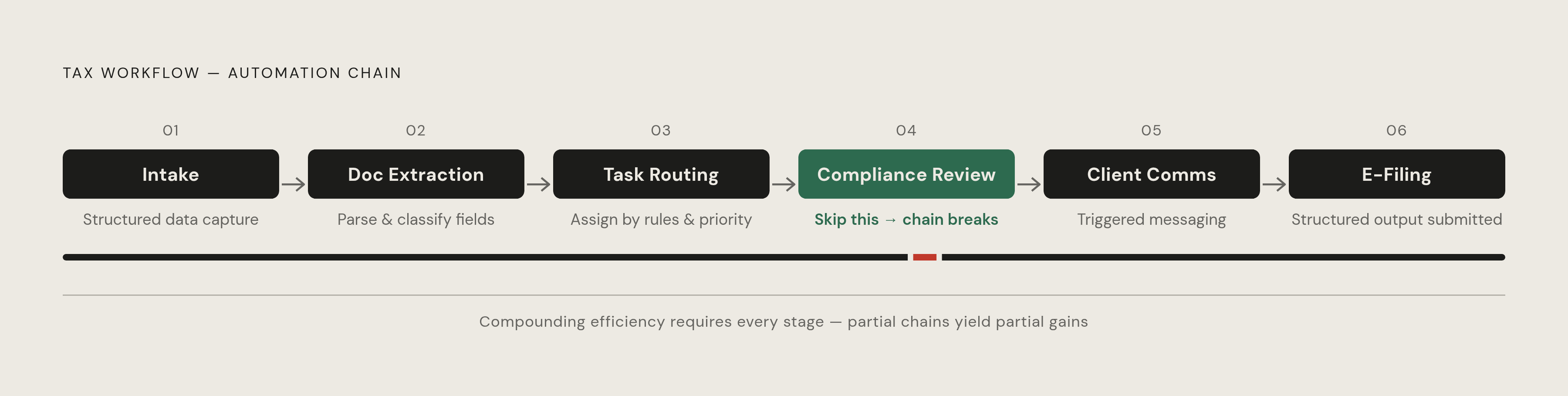
The sequence that works in practice runs from intake through document extraction, task routing, compliance review, client communication, and finally e-filing. Each stage feeds the next. Automating only the middle of that chain — say, intake and routing but leaving compliance review manual — leaves most of the compounding benefit unrealized.
One point worth stating plainly — automating the client-facing layers before the back end is reliable creates problems rather than solving them. Clients who receive polished automated communications while experiencing chaotic document handling lose confidence quickly, and that confidence is difficult to rebuild. Get the interior right before modernizing the exterior.
What Each Stage of the Tax Workflow Can Actually Do Automatically
The capabilities available at each stage of the tax workflow are mature enough now that a small firm can automate the full sequence end to end, using tools priced for practices without enterprise budgets.
At intake, OCR technology reads K-1s, 1099 variants, and W-2s in seconds and auto-populates the corresponding fields in tax preparation software. This eliminates manual transcription, which is the step responsible for the largest share of data-entry errors.
Workflow routing systems assign returns by complexity and preparer capacity, and surface bottlenecks before deadlines begin to slip. This replaces the daily triage email, the morning check-in, the ad hoc reassignment that interrupts everyone. The system makes visible what was previously tracked in someone's head, usually the most senior person in the room.
At the review stage, real-time compliance checks flag discrepancies and missing fields against current regulations before a preparer ever touches the return. The correction happens before the return enters the queue — minutes rather than hours, a distinction that matters when a firm is processing returns through a narrow April window.
Client communication runs without staff involvement once configured. Automated status updates and document request reminders go out on schedule. AI-assisted drafting tools generate plain-language explanations of outstanding items, maintaining a consistent tone across the firm regardless of who would otherwise have sent the message.
E-filing is fully automatable once a return clears review. Confirmation tracking and status reporting loop back into the workflow system and close the record without manual follow-up.
Each stage produces structured data that the next stage consumes. That architectural logic is what makes full-sequence automation meaningfully more powerful than piecemeal implementation — the compounding effect only activates when structured outputs from one stage flow cleanly into the next.
The Efficiency Gains Firms Are Reporting, and What the Numbers Actually Reflect
The Thomson Reuters 2025 Future of Professionals Report found that tax and accounting professionals estimate AI saves them 240 hours annually, roughly six full work weeks, that can be redirected toward advisory and higher-margin work. Thomson Reuters UltraTax user data shows that firms implementing AI review features complete routine 1040 preparations 38% faster, and that AI-assisted returns require 52% less review time.
On scheduling specifically, the before-and-after picture from the Financial Cents data is direct — before automation, 53.8% of firms spent more than five hours per week on scheduling alone; after implementation, 75.8% reduced that time to five hours or less.
These figures warrant honest scrutiny. The UltraTax completion and review-time figures come from Thomson Reuters' own user data, and the scheduling figures come from a Financial Cents self-reported survey — both conducted under conditions that favor favorable outcomes. Partial implementation, inconsistent staff adoption, and misaligned tool selection all produce results that fall well short of the headline averages.
That said, the directional signal is reliable. Seventy-eight percent of firms that deployed comprehensive automation in 2024 grew revenue per staff member rather than reducing headcount, according to the Financial Cents report. At small firms, automation is a capacity play — more work through the same team, not the same work through fewer people. Payback periods typically run between four and nine months depending on firm size and workflow complexity — a useful benchmark when evaluating upfront costs, though firms should treat this as an industry estimate and model their own costs accordingly.
How Automation Creates Room for Higher-Margin Advisory Work
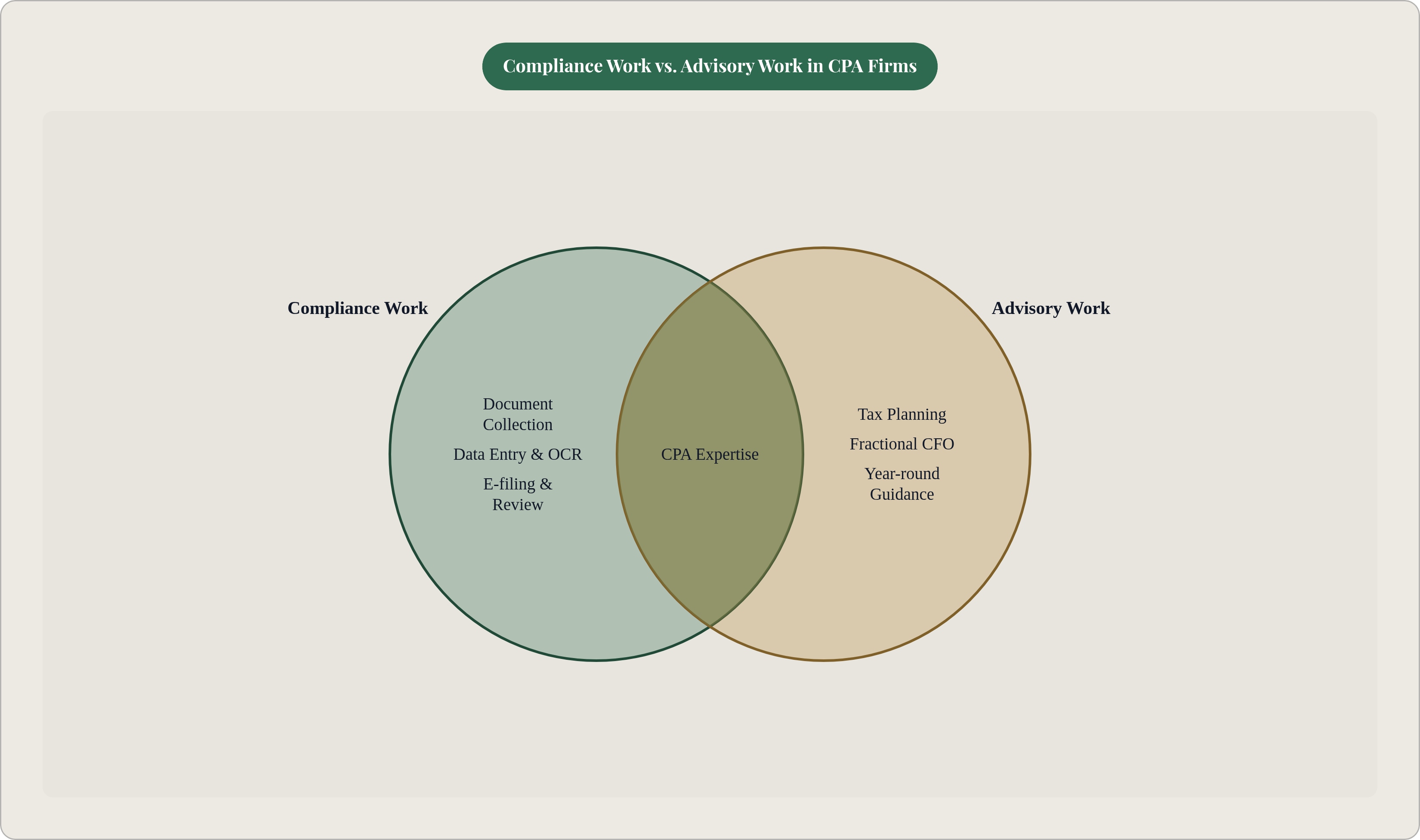
Traditional compliance work generates somewhere in the range of $300 to $500 per tax return, with limited room to expand that margin. Advisory engagements — tax planning, fractional CFO services, year-round financial guidance — command several thousand dollars per client annually. The constraint on reaching that ceiling has always been the same — the practitioner's time, consumed by compliance work that automation can now absorb.
Manual tax planning requires between eight and twelve hours of CPA time per comprehensive plan. AI-assisted platforms reduce that to two to three hours of review and client communication. These ranges reflect practitioner estimates from industry surveys, not controlled studies; actual time savings will vary by engagement complexity. A practitioner working at that pace can serve meaningfully more advisory clients without extending hours, which changes the firm's economics without changing its headcount.
The 2024 CPA.com and AICPA PCPS Client Advisory Services Benchmark Survey found that firms generating significant revenue from CFO-level advisory services earned more than 30% higher monthly recurring revenue than compliance-focused peers. Advisory and consulting offerings expanded from 47% to 84% adoption across firms in a single year, which means the differentiation window is narrowing. Firms waiting for their back end to be perfect before building advisory capacity are watching the opportunity compress in real time.
The mechanism is straightforward: automation absorbs routine work and returns the practitioner's attention to the judgment-intensive conversations clients pay premium rates for. Small firms that use compliance as a gateway to year-round advisory relationships, rather than a once-a-year transaction, build the recurring revenue base that makes growth predictable and staff retention sustainable.
Choosing Tools That Fit Tax Engagements, Not Generic Accounting Tasks
The tax workflow has specific data types, regulatory cadences, and client communication patterns that general-purpose accounting software wasn't designed to accommodate. Purchasing a generic workflow tool and expecting it to handle a tax-specific engagement sequence is a common and costly mistake. The gap becomes visible at the worst possible moment — close to a filing deadline.
All fifty U.S. states maintain their own tax preparation rules. Firms with clients across state lines need tools that track multi-jurisdiction compliance, not just federal forms. Generic platforms typically don't handle this well.
Several purpose-built options are worth evaluating for small to mid-size practices. Thomson Reuters UltraTax CS offers enterprise-level capabilities scaled to any practice size. SurePrep focuses on data entry and workpaper automation. ATX suits sole practitioners and very small firms, offering a wide form library with a low learning curve for practices just beginning to systematize.
The evaluation criteria should be specific. Does the platform handle the return types your clients actually file? Does it integrate with your existing tax preparation software without requiring a middleware workaround? Does it automate the intake-to-filing sequence, or only a portion of it? What does implementation actually require from a two- or three-person team during a live filing season? These questions surface the practical constraints that vendor demos tend to obscure.
On the emerging end of the market, Thomson Reuters launched its Ready to Advise and Ready to Review capabilities in July 2025, built on the CoCounsel platform. Wolters Kluwer demonstrated agentic capabilities through CCH Axcess Advisor at AICPA ENGAGE 2025. Full adoption at small firms is still early, but firms that understand the trajectory will be better positioned to evaluate these tools when they mature and become accessible at smaller scale.
What Small Firms Get Wrong When They Implement Automation
Only 10% of small firms use metrics to track their technology's impact, according to the 2025 Financial Cents State of Accounting Workflow Automation Report. Without measurement, a firm can't determine whether automation is working, which workflows are underperforming, or where configuration gaps are costing time. Implementation without measurement is an act of faith, not management.
The most common sequencing error is purchasing client portal software before fixing the document intake process. Clients encounter a polished front end attached to a chaotic back end, and credibility erodes from there.
Underestimating change management is equally pervasive. Staff who have handled intake manually for years need clear process documentation and structured transition time, not just a login and a thirty-minute walkthrough. A sophisticated platform configured and then ignored by preparers who default to prior habits produces no efficiency gain at all.
Automating without standardizing first is perhaps the most technically damaging mistake. If three preparers handle the same document type three different ways, automation amplifies the inconsistency rather than eliminating it. Standardize the workflow before automating it.
Finally, treating automation as a one-time purchase rather than an ongoing configuration is a structural error that compounds over time. Tax law changes every year. Client mix shifts. Software platforms release updates that affect integrations. Firms that revisit their automation setup each filing season maintain their gains; those that don't watch them erode quietly until the next season reveals the gap.
How to Build a Practical Implementation Plan for a Small Firm
Begin by auditing current workflow time before buying anything. Use actual timesheets or a one-week manual tally to identify precisely where hours are going. The Financial Cents benchmark of more than five hours per week on scheduling alone provides a useful comparison point.
From there, identify the single highest-volume, most repetitive workflow causing the most friction. For most firms this is client document collection or data entry. Automate that workflow completely before expanding to others. Partial automation of multiple workflows simultaneously produces confusion and underperformance across all of them.
Choose a platform that handles tax-specific document types and integrates with existing preparation software. Avoid onboarding two unconnected tools at once. Integration failures between systems consistently consume more time than the automation saves.
Before activating any automation, standardize the manual version of the workflow. Document each step, assign clear ownership, confirm that everyone on the team follows the same process. This step is tedious and easy to skip — skipping it is the reason implementations fail.
Run the automated workflow in parallel with the manual process for the first few weeks. Compare outputs. Catch configuration gaps before they affect client deadlines. This parallel period is quality control at the most consequential transition point.
Define two or three measurable outcomes before launch — hours per return, scheduling time per week, errors caught before filing. Review these metrics at the end of the season. Skipping this is why most firms can't determine whether their automation investment paid off.
The four-to-nine month payback window — an industry estimate that individual firms should model against their own costs — means a firm that begins implementation before the next filing season can realistically expect to recover costs within that same cycle. Once the back end is running reliably, the capacity it frees becomes the foundation for building advisory offerings — from operational efficiency to higher-margin work, built one automated workflow at a time, in sequence, with discipline.