Client Intake Automation in Tax Practices
Automated intake cuts client setup from $400 to $29 per engagement and unlocks hidden capacity.

What the Manual Intake Process Actually Costs in Staff Time and Revenue
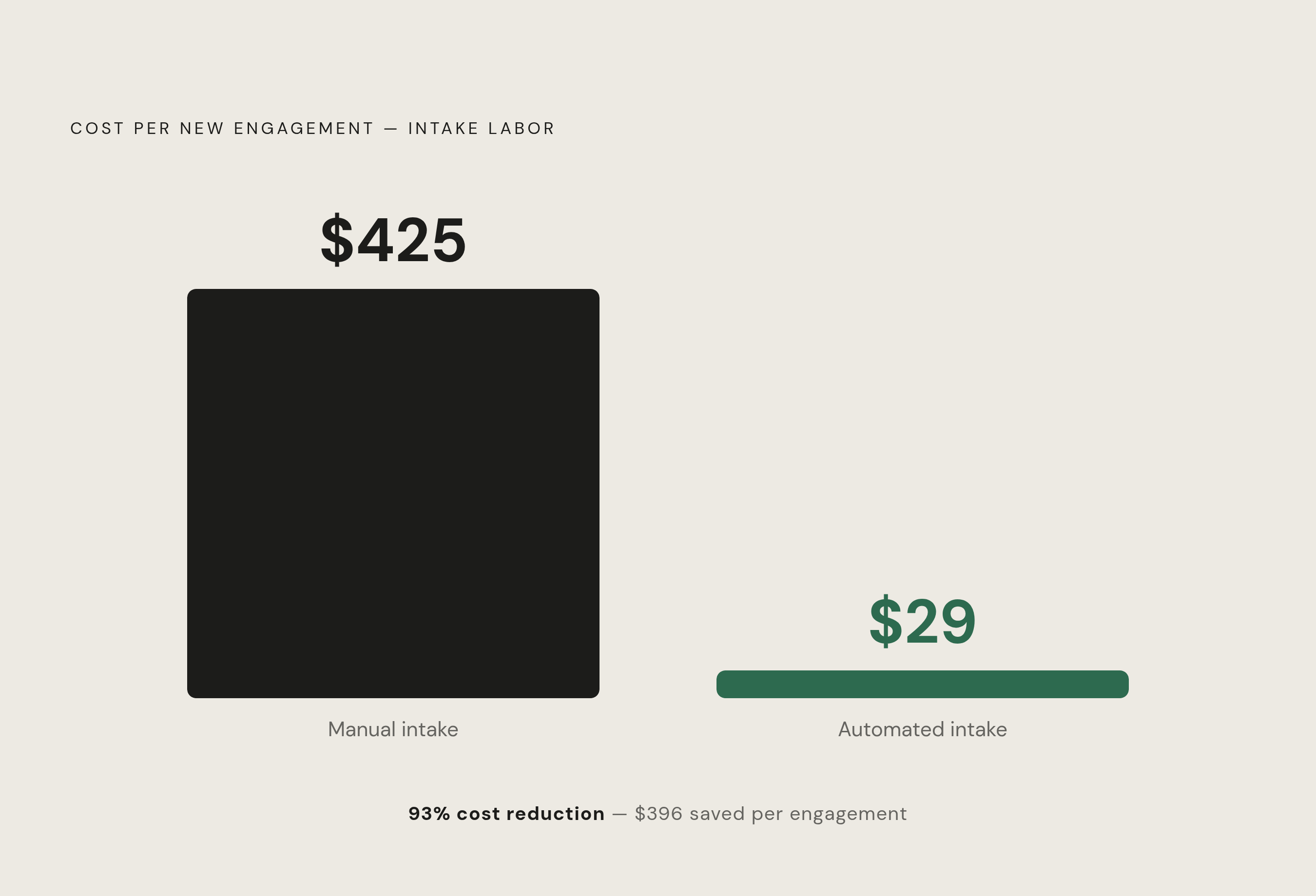
The costs are specific and compound quietly — unnoticed until you look back at a full busy season and wonder where the time went. Industry benchmarks put manual intake somewhere around $400 to $450 in administrative labor per new engagement. Automated systems can bring that figure down to roughly $29. The spread between those numbers is not a technology argument — it's a straightforward accounting problem that has gone largely unexamined.
Work through the arithmetic at your own firm. Take staff time per engagement, apply a fully loaded hourly rate consistent with Bureau of Labor Statistics figures for accounting support staff, and count the touchpoints. A firm onboarding 150 new clients annually, with staff spending roughly four hours per client on intake tasks, accumulates more than 600 staff hours before a single return is prepared. That's north of $25,000 in overhead devoted to document chasing, organizer follow-up, and coordination work that lives in no one's job description but occupies everyone's calendar.
Approximately 65% of firms with fewer than 20 staff still rely primarily on email-based onboarding with no automation, per the AICPA's 2024 PCPS CPA Firm Top Issues Survey. The competitive disadvantage this creates is concrete. Firms that have automated this layer move faster, spend less doing it, and deliver a more consistent client experience from the first touchpoint. Firms still running intake through email are absorbing costs their competitors have already eliminated.
The revenue damage is less legible than the labor cost but no less real. Accounting firms surveyed by CPA Practice Advisor in 2024 report spending an average of more than nine hours per week on client communication, a figure that includes substantial intake-related back-and-forth. That time compresses preparation timelines, crowds March and April, and shrinks the window available for review and quality control. Errors that occur under compressed timelines are not random; they are predictable outputs of a process that leaves too little time for work requiring genuine judgment.
How Intake Delays Create a Capacity Ceiling During the Busiest Months
About 61% of firms report turning away new clients during tax season due to capacity constraints, per Accounting Today's 2024 Busy Season Survey. That figure circulates widely in the profession. What follows it less often is that 44% of those turned-away clients never return. The capacity ceiling carries a direct retention cost, and it is largely self-imposed.
The constraint is not headcount. A 20-person firm doesn't need to hire its way out of this problem. Firms that compress intake to under 48 hours, through automated document requests, triggered follow-up sequences, and structured organizers, begin billable work several days earlier per engagement than firms still running intake through email. For a firm carrying 40 concurrent engagements during peak season, that lead time accumulates into real additional capacity. The arithmetic is simple. The reluctance to act on it is the more durable problem.
This is a throughput problem. Practitioners are available. The engagements are there. What's absent is a system that moves each engagement into production without staff manually shepherding it through every step, touching the same file three or four times before a preparer opens it. The ceiling isn't built from a shortage of people. It's built from a shortage of process.
What Automated Intake Actually Does, Step by Step
Automated intake is not a document portal. It is a triggered workflow system that collects engagement information, gathers documents, verifies identity, and syncs client data to a practice management platform, all initiated by a single submission event and completed without manual staff intervention at each stage.
The trigger is typically an engagement letter signature. When that event fires, the system launches a document request sequence tailored to service type. A 1040 with W-2 income generates one checklist; a partnership return with foreign holdings and equity compensation generates a different one. No staff member decides what to request or when to send it. The rules are configured once and applied consistently across every engagement. That sounds unremarkable until you consider how rarely that consistency exists in a firm running intake through email and institutional memory, where the same client might receive different requests in different years depending on who happened to be at the desk.
Document extraction operates on whatever the client submits. Optical character recognition and natural language parsing read W-2s, 1099s, K-1s, and receipts; map fields to the relevant return schedules; run validation checks; and flag mismatches or missing items before any preparer touches the file. The preparer who opens that engagement sees a file that has already been sorted, checked, and flagged, not a folder of PDFs that arrived in no particular order across two weeks.
Complexity scoring routes each engagement to the appropriate queue automatically. Points are assigned based on factors such as multi-state filing, equity compensation, cryptocurrency transactions, rental income, and foreign tax obligations. Simple returns and complex ones are separated without a staff member making that determination case by case.
One distinction worth making, since modern platforms contain both elements and practitioners routinely conflate them: automation is rule-driven, executing a defined sequence when a trigger fires; AI involves pattern recognition, identifying that a particular form is a K-1 and extracting its fields accurately even when formatting varies across issuers. Both are present in leading platforms. Practitioners retain final review throughout. The system removes coordination overhead. It does not substitute for professional judgment.
How Much Intake Automation Changes in Practice, with a Concrete Example
Consider a nine-person firm preparing roughly 480 individual returns annually. Before automation, staff sent organizers manually and spent close to 70 hours per season following up on incomplete responses. About 14% of clients submitted forms with at least one required field missing, which triggered additional back-and-forth before preparation could begin. Fourteen percent sounds manageable until you recognize it represents nearly 70 clients, each requiring at least one additional touchpoint and the staff time that entails.
After implementing automated intake, follow-up time dropped from 70 hours to approximately 18. Missing-field submissions fell from 14% to around 4%. Preparation began several days earlier per client. The staff didn't work differently in any fundamental sense. The system worked on their behalf between client submission and the moment a preparer was actually needed.
Broader benchmarks are consistent with this pattern. Firms automating new client onboarding reduce setup time from five to ten business days to approximately 48 hours, per CPA Practice Advisor's 2024 Technology Survey. Firms using workflow automation platforms report staff hours eliminated per new engagement in the range of 80 to 85% compared to manual processes. A firm that previously spent two hours per client on intake tasks now spends fewer than 20 minutes.
That recovered time is not administrative slack. It is capacity available for review, for advisory conversations, for the client-facing work that judgment alone can produce.
The Tools Available and How They Differ by Firm Size and Workflow
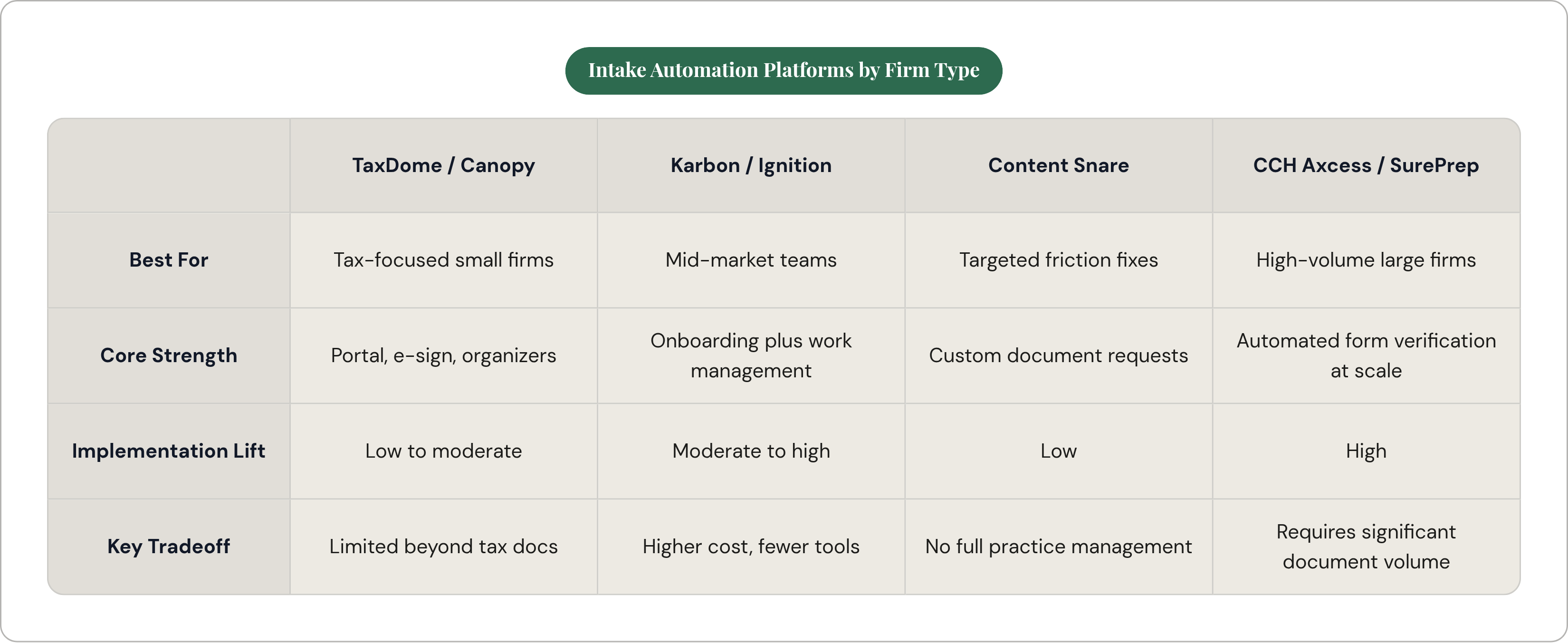
Selecting an intake automation platform is a workflow decision before it's a technology decision. The right tool depends on firm size, the composition of the client base, and whether the goal is to address a discrete friction point or undertake a broader operational consolidation.
Tax-First, All-in-One Platforms
Several platforms occupy this segment, centering on client portals with e-signature, document collection, and organizer functionality. Some report serving tens of thousands of firms and suit practices whose onboarding is dominated by tax documents and engagement letter management. Others add AI-powered document matching and predictive checklist generation, reducing the manual configuration required when service types vary across the client base.
Mid-Market Team Collaboration Platforms
Karbon and Ignition bundle onboarding into broader work management systems. The same tool that collects documents assigns the engagement, tracks progress through preparation, and manages billing. Ignition converts proposals directly into engagement letters and automates payment collection at signing, eliminating a separate step that many firms handle informally until a collection problem surfaces months later. Implementation cost is higher, but the tradeoff is fewer disconnected tools in the operational stack.
Specialized Document Collection Tools
Content Snare excels at customizable request forms for complex or non-standard document requirements. It doesn't require a full practice management overhaul, making it viable for firms that want to address a specific friction point without replacing existing infrastructure.
Enterprise and Large-Firm Platforms
CCH Axcess and SurePrep serve larger practices with higher document volume. SurePrep's 1040SCAN automatically verifies a substantial share of standard forms and supports document processing volumes several times greater than older manual tools, making it appropriate for firms preparing thousands of returns annually.
Pricing and Implementation
Accounting-specific platforms in this space are generally priced between $35 and $60 per user per month based on published vendor pricing, though rates vary by tier and firm size and should be confirmed directly with vendors. Implementation, including configuration and staff training, typically runs between $2,000 and $5,000 for a five-to-ten-person firm. Payback on staff time savings averages three to four months, though it depends heavily on volume and how manual the prior process was.
Where Adoption Stands and Why the Gap Between Intention and Investment Persists
As of 2025, nearly three-quarters of accounting and CPA firms have implemented some form of AI or automation — a several-hundred-percent increase from 2022 levels, per Thomson Reuters' Future of Professionals Report 2025. Document extraction is the most common application, with adoption above 80% among firms that have automated any part of their workflow.
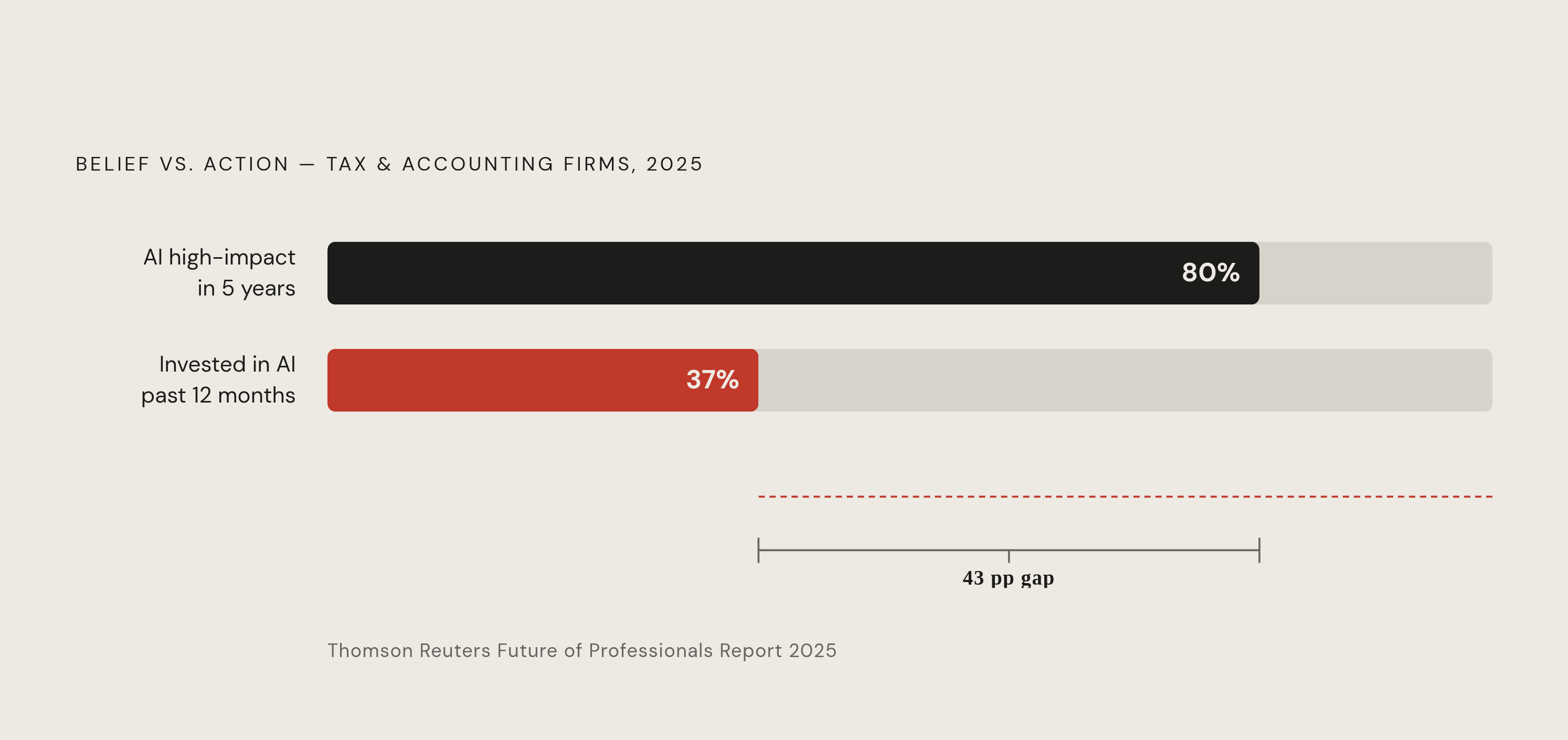
Conviction hasn't reliably produced investment. Close to 80% of tax professionals believe AI will have high or transformational impact within five years, yet only about 37% of firms have invested in new AI-powered technology in the past 12 months, per the same report. That gap reflects something real about how firms evaluate risk.
The training gap compounds it. Only about one in four tax, accounting, and audit firms has provided staff training on generative AI, the second-lowest rate across all professional services, per the 2025 Generative AI in Professional Services Report. Purchasing a platform without training the people who will use it produces the worst possible outcome: the implementation cost without the efficiency gain.
A substantial majority of managing partners at firms under 100 staff cite technology adoption in client-facing workflows as a top-three operational priority, with client intake identified as the highest-friction touchpoint, per the AICPA 2024 PCPS CPA Firm Top Issues Survey. The problem is understood. What takes longer to resolve is the distance between recognizing a problem and committing to a solution that might introduce new ones. Firms tend to move only after watching a peer work through it over a full season at close enough range to see what actually happened. That evidence travels slowly, which is why the research phase extends long past the point where the math has already made the case.
The Barriers That Slow Implementation and How Firms Actually Get Through Them
Data quality problems affect the majority of firms during initial implementation. Tax data arrives from ERP platforms, spreadsheets, and email threads carrying inconsistencies that break structured workflows. Cleanup typically runs two to three months before automation performs reliably. That's not a surprise to anyone who has sat through the first pass of migrating a legacy client list into a structured platform and watched the duplicates and mismatched fields surface one by one. The automation doesn't create the disorder. It makes visible what staff had been quietly working around for years. That exposure is useful. It is also genuinely uncomfortable.
Staff resistance tends to follow from a specific source. The issue is not that staff resist efficiency. Undocumented workarounds — adjustments built around one client's idiosyncrasies or one partner's preferences — are invisible until a system attempts to replace them. When those workarounds surface, the conversation that follows is a personnel question, not a software configuration question.
Security and data privacy are legitimate concerns, not procedural friction to minimize. Data security ranks as the top concern for tax firm respondents in the 2025 Generative AI in Professional Services Report. Firms need to vet how platforms store, process, and transmit client data before deployment, not after something has gone wrong.
One risk that receives less attention: a highly automated onboarding sequence can feel impersonal. Efficient systems amplify the communication style of the firm that designed them. A cold, transactional tone delivered at scale is still cold. Automation handles the logistics. The tone still requires deliberate design by the people running the firm.
The sequencing that actually works is incremental. Start with the single highest-friction step, typically document collection or organizer follow-up, automate that step specifically, measure the result, and then expand. Firms that attempt to automate every part of onboarding simultaneously report longer cleanup periods and sharper staff resistance. The ones that succeed treat the first implementation as a proof of concept, not a transformation.
What Intake Automation Makes Possible Once the Administrative Layer Is Cleared
The capacity gain is measurable. Firms using automated onboarding workflows accept roughly 23% more new clients during tax season without adding staff, per the AICPA 2024 PCPS CPA Firm Top Issues Survey. The constraint that was turning clients away in February diminishes substantially once intake overhead is removed from the staff time equation.
Retention improves alongside it. Firms that standardize their onboarding process retain clients at 15 to 20% higher rates than those using informal procedures, per the same survey. A well-designed intake experience communicates competence before the first return is filed. Clients who experience a disorganized first interaction carry that impression into every subsequent one.
For a firm managing 200 returns, automating even an hour of administrative friction per engagement reclaims 200 hours annually. Those hours are now available for planning conversations, complex entity questions, and judgment-dependent advisory work that no workflow tool can replicate.
That reallocation is the substantive outcome. Practitioners freed from document chasing are available for the work that actually requires their training. Intake automation removes the coordination overhead sitting between the signed engagement letter and the engagement itself. The firms that have already cleared it are running the busiest months of the year with a margin that wasn't there before.