Revenue per Client Metrics That Tell Solo Enrolled Agents Which AI Tools Actually Pay Off
Solo EAs can price AI tools by the advisory revenue their saved hours unlock.

A solo enrolled agent can grow without hiring by using AI to recover preparation hours and convert them into paid advisory work. The right scorecard is revenue per client. Document intake automation comes first, grounded tax research follows, and planning software pays off when the practice has recovered time to sell advisory engagements, with human review throughout.
Why revenue per client is the right scorecard for evaluating AI tools in a solo EA practice
Feature lists measure software capability. A low subscription price can conceal a poor fit, while a more expensive tool can justify its cost by removing the work that blocks billable engagements. The missing step is conversion into revenue. Recovered hours create financial ROI only when the practitioner can put them to paid use.
That distinction is especially important in a solo practice. Much of the AI tax software market is sold to multi-seat CPA firms, so a sole practitioner pays for capacity that goes unused and has to learn the software alone. Revenue per client makes that mismatch visible. The evaluation should begin with the hours lost to repetitive work, then price the forgone advisory opportunity and assess whether the tool can close that gap.
The revenue gap between prep-only and prep-plus-advisory clients, and what it means for capacity
The effective hourly rate for prep-plus-advisory work is roughly double that of prep-only work. The difference reflects more than an additional deliverable. Preparation meets the duty to file, while planning gives the client a reason to keep working with the practice on decisions still to come. That relationship changes what the same limited working hours can earn.
Capacity also has a calendar dimension in a solo practice. A crushing filing season followed by underused months is not corrected merely by shaving minutes off returns. Faster preparation can ease the workload now while leaving the pattern of revenue across the year unchanged. Planning opens a second revenue channel across more of the year. The economic opportunity therefore depends on both the hours recovered and the engagements those hours can support.
How to run the hour-recovery calculation before buying any tool
The calculation begins with work the practice already performs. Estimate the hours spent per client on intake, document chase, research and draft review, then work out how much of that work a proposed tool could handle. Multiply that recoverable time by the number of clients to whom it applies. The 2026 estimate of 60–90 minutes recovered per return through automated document collection and data entry provides a starting assumption, with actual results dependent on the practice.
Next, value the hours at an achievable advisory rate. An hourly fee can be applied directly to the capacity recovered, while engagement pricing requires estimating how many planning engagements fit into that capacity. Available hours are not yet earned fees. The revenue case depends on closing those engagements, so the calculation should reflect what the EA can sell rather than what the software could theoretically accommodate.
The useful output is a break-even threshold. If the tool costs $X/year and an advisory engagement brings in $Y, dividing the annual cost by the engagement fee gives the number of additional engagements needed to cover the subscription. A fuller check weighs the revenue the tool is expected to bring in against its total cost for the year, including the work of learning and using it. A meaningful margin is necessary because review and implementation consume some of the apparent savings.
An EA without advisory clients can run the calculation in reverse. Value the recovered time at preparation rates and determine how much additional paid preparation work would cover the cost. That establishes a conservative revenue floor. Advisory conversion can then be evaluated separately in the purchase decision. A tool that fails even this first test needs more than a good demonstration to make it worth buying.
Where hours actually go in a solo EA practice, and which AI layer attacks each one
Document intake and OCR address the administrative loop around a return. They classify incoming files, flag missing documents and reduce collection follow-up. This work always touches protected client data. Consent analysis and written information security plan coverage therefore precede file transfer. The primary purchasing test is whether the tool removes collection and entry work without introducing a parallel workflow.
Tax research tools compress authority lookup, but their central risk is a fabricated citation. Notice and representation drafting tools address a different bottleneck by accelerating CP2000 replies and similar correspondence. Neither category removes the practitioner’s review obligation. The practitioner must check the sources used in research, and a human must review representation drafts in full before they leave the firm. Their value must be measured after that review time.
Practice workflow tools send tasks where they need to go, draft follow-up emails and keep track of open-items lists. Their data exposure is generally lower than intake or research, but return information passing through them triggers the same consent analysis. Advisory platforms serve a different economic purpose. They model scenarios, sequence strategies and produce billable planning deliverables. These five categories are distinct layers, so a broad all-in-one feature list is not evidence that a product resolves the practice’s most expensive bottleneck.
Document intake automation: the highest-satisfaction ROI and why it comes first
Document collection automation consistently ranks as the highest-value AI investment among implementing practitioners because its payoff is immediate and measurable. The repetitive work is easy to identify. Automated portals and extraction cut the work of chasing documents, and full sets of documents arrive weeks earlier on average. Earlier completion can mean fewer extensions and shift more billing from the fall to before the deadline.
The 2026 data describes document automation delivering 5x+ ROI within the first quarter. That benchmark does not replace a practice-specific calculation. Its relevance is the short path between adoption and observable time recovery, rather than a long learning curve before any benefit appears. A solo EA can count follow-ups avoided and entry time removed. Those measures provide a firmer purchase case than an undifferentiated promise of productivity.
A BAA or equivalent agreement must address compliant handling of return information, but it does not replace the firm’s consent obligations. Clean W-2s are not the hardest test. A human still needs to check handwritten mileage logs and scanned K-1 footnotes, and extracted data should go into the existing prep platform without having to be entered again elsewhere. Purpose-built intake tools come first because the recovered hours are straightforward to count and can then be allocated to advisory work.
AI tax research tools: where citation discipline separates the useful from the dangerous
Citation integrity outranks speed in tax research. An answer produced in two minutes can create more liability than the two hours it replaces if its supporting code section does not exist. General-purpose models are useful for inexpensive drafting and summarizing, but they can make fabricated authorities look authentic. Circular 230 responsibility remains with the practitioner. The ROI calculation must therefore account for lookup time, verification and the exposure created by a false citation.
A tool that answers from uploaded documents and identifies the exact passage supporting a claim gives the EA a traceable route back to the source. Tools built for tax research use IRS publications, tax codes, court rulings and private letter rulings as sources. That focus on tax research can make them worth a higher price. Neither approach eliminates the need to assess whether the cited authority actually supports the proposed advice.
Jurisdictional coverage is another decisive purchasing criterion. A federal-only tool leaves the EA doing manual research when a multi-state client needs state income tax, sales and use tax or property tax analysis. The practical pro tip is unambiguous. Always open the cited source directly before using the authority in client work, regardless of the tool’s confidence score. Research software earns its place when it shortens the path to verifiable authority in the jurisdictions the practice serves.
Advisory and planning platforms: the only AI category that raises the revenue ceiling
Compliance automation lowers the cost of delivering a return. Planning software instead supports deliverables that command advisory-level fees, including entity scenarios, retirement sequencing and timing strategies. A practice can complete its existing work faster without changing what any client pays. Planning is the category that directly connects recovered capacity to a higher-value service.
Instead, formerly Corvee, TaxPlanIQ, Holistiplan, Intuit Tax Advisor and Uncle Kam are options focused on scenario modeling and client-facing deliverables. TaxPlanIQ describes its offering in terms of scenario modeling and client-ready reports and presentations. The right product still depends on the engagement the practice is selling. The relevant criteria are the strategy library, deliverable format and client communication layer. Purpose-built advisory tools reduce the adaptation needed to turn planning work into a service an EA can present and bill for.
AI parses documents and surfaces scenarios, deterministic engines perform the tax math, and a human reviews and signs off. EY’s 2026 International Tax and Transfer Pricing Survey found that only a small minority of tax functions meaningfully deploy AI agents or machine learning. That leaves room for early adoption focused on paid planning work.
Compliance and security requirements that determine whether any AI tool is legally usable
Legal usability is a purchase condition. IRC §7216 requires written taxpayer consent before return information goes to a third party unless a regulatory exception applies. Consent must precede the transfer. Violations can bring criminal penalties, including fines up to $1,000 per violation under the 2026 figures and imprisonment, while §6713 provides civil penalties. Pasting a client’s Schedule C into a public chatbot is therefore not merely an information-management mistake.
Under the FTC Safeguards Rule, professional tax preparers are financial institutions that must keep a written information security plan and oversee their service providers. That oversight must cover every AI vendor that handles taxpayer data. OPR Alert 2026-19 applies Circular 230 due diligence, competence and confidentiality standards to AI use. The NAEA webinar on WISP, AI and incident response addresses that guidance for practitioners. The EA still has professional duties to meet, whatever a vendor claims about its security.
The sales conversation should make these obligations concrete. The EA should ask whether the vendor agrees in writing not to train models on client return data and whether its DPA or BAA covers §7216-compliant handling. Data location and access need explicit answers. The conversation should also establish whether written consent is required before use and whether the tool supports that workflow. Within the firm, the EA must confirm the vendor’s coverage in the WISP as a service provider.
The EA should ask for the vendor’s notification timeline and process, and whether AI outputs can be traced to source documents. Certification is a separate consideration. SOC 2 is a voluntary AICPA attestation, with §7216 responsibility remaining with the practitioner. These questions make compliance vetting part of product selection rather than a separate exercise after client data has already moved.
Applying the revenue-per-client framework to pick the right tools and sequence their adoption
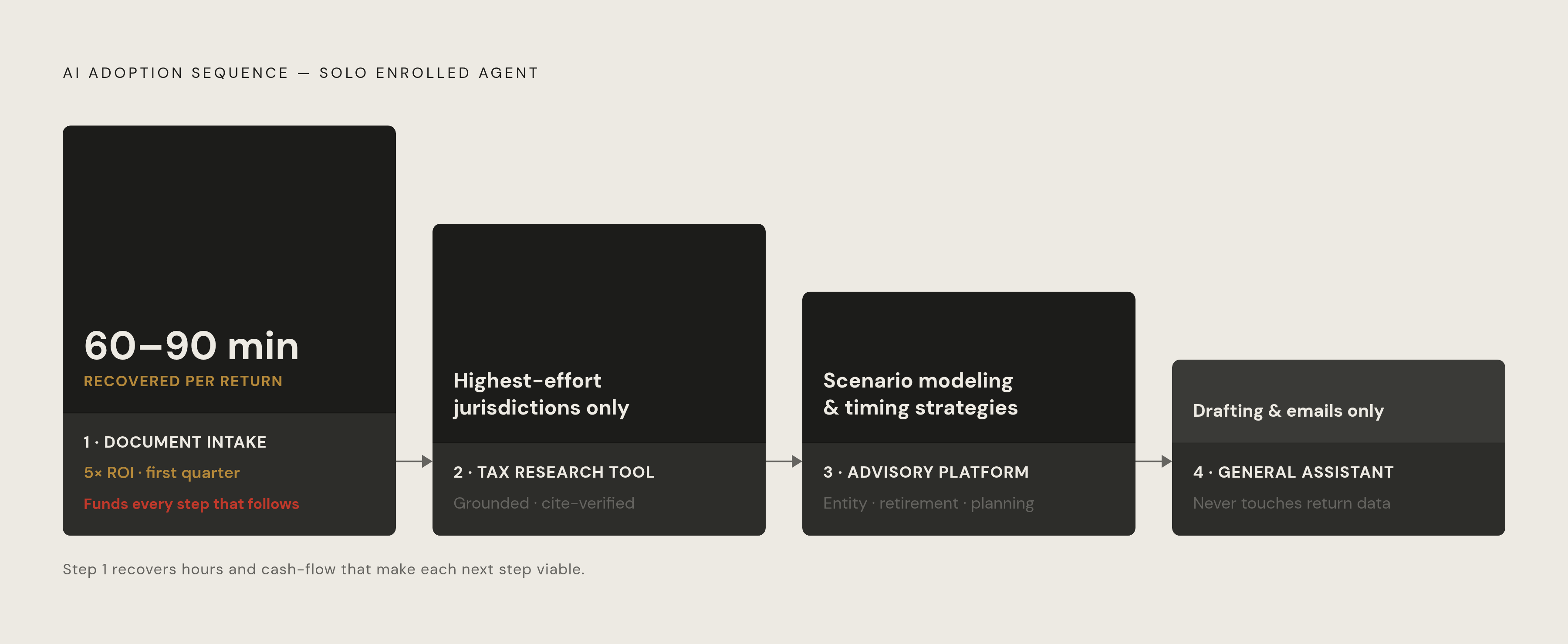
The recommended sequence begins with document intake because its recovered hours are the easiest to measure. A grounded research tool follows, selected for the jurisdictions consuming the most manual effort. Multi-state practices need to check what SALT coverage the tool has. A planning platform comes next, once recovered hours are available for advisory engagements. Low-cost general-purpose assistants can also help with drafting, client emails and plain-English explanations, as long as they stay off client return data.
Each purchase should pass the same first-year economic test. Its annual cost should fall below the advisory revenue that the recovered hours can realistically generate. If it does not, the sequence or product fit needs reconsideration. Focused tools can resolve distinct bottlenecks without making a permanent patchwork the goal. Purpose-built systems that handle intake, document review and compliance checks can reduce backend triage while preserving the practitioner’s control over advice.
Moving a portion of prep-only clients into annual planning relationships increases revenue per client and spreads paid work across more of the calendar. The practice competes more on judgment than price. With meaningful adoption still early, solo EAs who build that capacity now can establish an advisory service before the market consolidates around a single tool. The durable gain is a better use of limited professional hours.